Entry Parameters: Fundamentals and Configuration
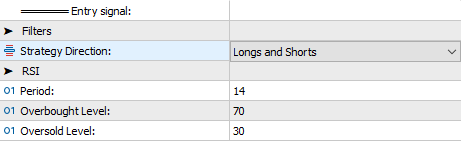
By adjusting the Period, Overbought Level, and Oversold Level fields of the RSI, users can fine-tune the trend reversal signals generated by Heikin-Ashi.
Additionally, the Strategy Direction field allows users to optimize parameters for a specific trading direction or apply the same configuration to both.

This feature makes it possible to run multiple instances of SENTINEL Heikin-Ashi on the same account, even operating on the same symbol.
The entry signal is complemented by precise risk exposure adjustments. The expert advisor calculates the position size based on the distance between the initial stop loss and the entry price, following the user-defined values in the VOLUME, RISK, and SPREAD parameter group. If the calculated size exceeds the available leverage, it will be automatically reduced to comply with restrictions. If the broker’s minimum size for the symbol prevents the trade from being executed, the entry will not occur, even with a valid signal.

The Risk Management menu offers three options for defining exposure: as a percentage of equity, balance, or as a fixed amount. When selecting Risk % of equity or Risk % of balance, the system interprets the value in the Risk Value or Fixed Volume field as the desired percentage. Conversely, if Fixed volume is chosen, this value corresponds to what is defined in MetaTrader’s “Volume” field.

The third field in the group, Acceptable spread (pts), defines the maximum spread allowed to execute trades, avoiding entries during high-spread market conditions. The configured value represents the system’s maximum spread threshold for order execution. Users may opt for a higher value in higher timeframes and a tighter value in timeframes where smaller price moves are expected.
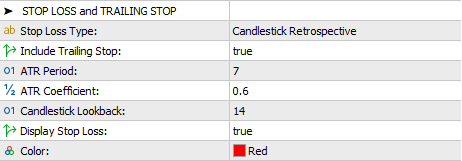
This version of SENTINEL sets Candlestick Retrospective as the default value for the Stop Loss Type field. This option determines the stop loss based on the high or low of a specified number of previous candles, which is defined in the Candlestick Lookback field. Additionally, a volatility-based margin can be added, the size of which is determined by the value in the ATR Coefficient field. The sensitivity of the ATR can be adjusted through the ATR Period field.
The Include Trailing Stop field enables the stop loss criteria to be updated at the start of each new candle (this adjustment only occurs if the change favors the trade). Stop loss level changes are displayed on the price chart if the Display Stop Loss field is set to true.
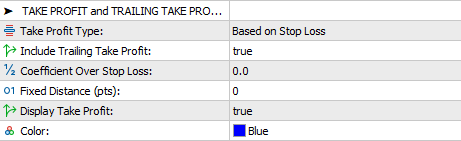
The Take Profit Type field provides two options: Based on Stop Loss and Fixed Distance.

When selecting the Based on Stop Loss option, the take profit distance is adjusted in direct proportion to the stop loss distance. This ratio is determined as a fraction or multiple of the stop loss distance, as specified in the Coefficient Over Stop Loss field.
With the Fixed Distance option, the take profit level is set at a specific distance in points, defined by the value in the Fixed Distance (pts) field.
Similar to the stop loss, the take profit configuration includes the Include Trailing Take Profit field, which allows the take profit level to be updated at the start of each new candle. This adjustment only occurs if the change favors the trade. Take profit level changes are displayed on the price chart if the Display Take Profit field is set to true.
#Entry #Parameters #Trade